Webmaster Ticketing System
We have a simple solution for smaller requests, updates, etc.
Small Tasks
Sometimes you just need a simple correction to your website. Perhaps a new person has joined your team or you’ve changed locations on campus. In cases such as these, there’s no need for a project request. Instead, add your small task to our webmaster ticketing system, and we’ll assign the work to one of our team members.
Getting Started – Create an Account
Set Up Your AccountSubmitting a Ticket
Submitting a ticket is easy.
- Start your project request.
- Click the “Add Request” button in the top right-hand corner of your screen. You’ll need to name your request before you’re able to select the appropriate creative brief/submission form.
- Once you’ve named your request, select the appropriate form from the drop-down menu.
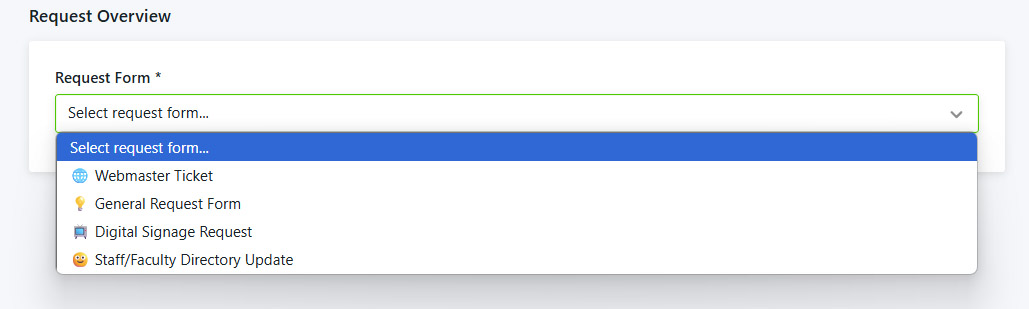
- Webmaster Ticket – quick changes to our public website
- Once you’ve filled out the information, be sure to hit the green “Submit” button at the bottom right for your screen.
- Once you’ve submitted all the necessary information, Lytho will send a confirmation email stating that Marketing has received your request.
- We review and approve requests regularly. We may decline your request if it’s missing information. If we decline your request, we’ll communicate what additional details we need to keep it moving.
24/7 Access to Your Requests, One Simple Stakeholder Portal
Digital Signage Requests
- Start your project request.
- Click the “Add Request” button in the top right-hand corner of your screen. You’ll need to name your request before you’re able to select the appropriate creative brief/submission form.
- Choose Digital Signage Request from the drop down to submit your file and information for campus screens.
NOTE: Graphics must be 1920×1080 pixels. We cannot accept poster-sized submissions.
Online Directory Update
- Start your project request.
- Click the “Add Request” button in the top right-hand corner of your screen. You’ll need to name your request before you’re able to select the appropriate creative brief/submission form.
- Choose Staff/Faculty Directory Update from the drop down to update your information in the online directory.
Office of Marketing
Location
Perry Hall
Room 322
Room 322
Office Hours
Monday – Friday
9:00 AM – 5:00 PM
9:00 AM – 5:00 PM